
Less Known Hexographer/Dungeonographer Features: Fog of War/GM-Only
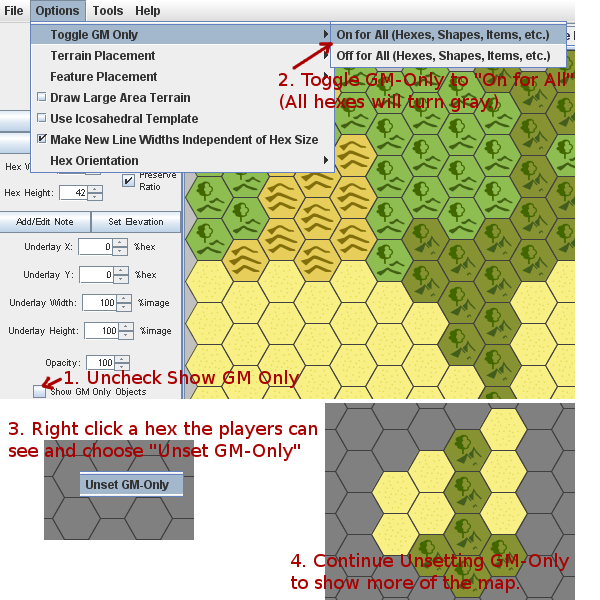
Sometimes in a hex crawl/exploration game or of course when exploring a dungeon you want to reveal the area in small sections. Perhaps a single hex or a few in a wilderness map; or a room or corridor at a time in a dungeon or interior map.
Hexographer has a concept of “GM Only” to accommodate fog-of-war functionality. Initially, everything you create has GM-Only off. However, you can easily switch everything to only be viewable in the GM’s version of the map through a toggle menu item. Here are the steps (they match the steps in the picture):
- Un-check the “Show GM-Only Objects” checkbox so when we do use GM-Only we’ll see the difference.
- Go to the “Options” menu and “Toggle GM Only” to on by choosing “On for All.” Your map will now turn to all gray. Note: If most of your map should be viewable by the players, don’t do this and instead in step 3, choose “Set GM-Only” for any hexes you wish to hide. (This will save time.)
- Right click a hex you wish to reveal and choose “Unset GM-Only.” Repeat this for each hex you wish to show the players. You can hide the hex again by right-clicking the hex and choosing “Unset GM-Only.”
- Share the area map with your players.
Dungeonographer has similar functionality, but the specifics vary quite a bit. First, you can add objects to the map with “GM-Only” set on and then toggle the “Show GM-Only Objects” checkbox to show or hide those features.
But more importantly, in Dungeonographer you can toggle rooms and corridors on or off. To do so, right-click a room or corridor section and you’ll see an option to “Hide all but this room.” Selecting that will turn the map to all black except the area you selected. You can continue right-clicking parts of the map as the party moves through the area.
For a room, the entire room is shown or hidden. For a corridor each square is hidden or shown individually. Note: To use this feature effectively, you need to create your rooms & cooridors using the “Shapes” tab with the “Is room/corridor” checkbox set to true. (Otherwise they will also be revealed square by square.)